


MyNISSAN®
4.73.08K Reviews
App Specs
- Version
- 6.9.110
- Updated On
- License
- Free
- Downloads
- 500,000+
- Developer
- Nissan North America, Inc.
- Categories
- Auto & Vehicles
- Platform
- Android, iOS
Screenshots
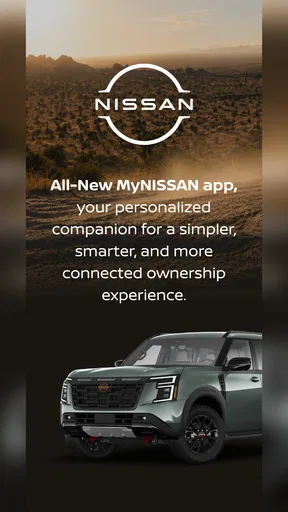
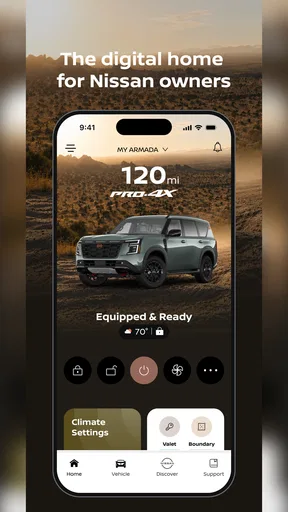
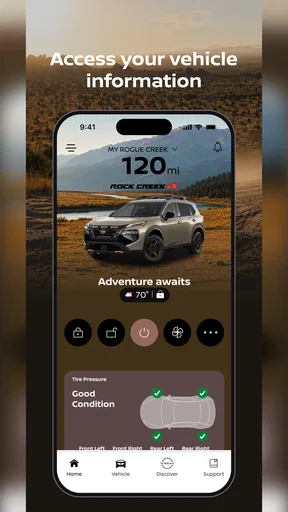
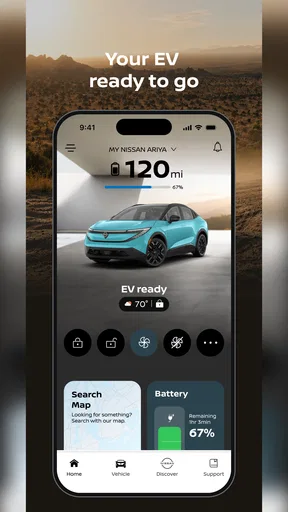
 Analysis by AppCompare
I judge a car companion app by whether it saves me a small hassle at the right moment, not by how many buttons it puts on a screen. MyNISSAN® is aimed squarely at Nissan owners: it brings vehicle-related tools and information to a phone, with remote control as its defining idea. That can be genuinely handy when the car is parked outside on a cold morning or when I want to keep routine ownership details in one place. It is less compelling if I do not drive a Nissan or prefer to handle every car task directly with a dealer or a paper calendar.
It is a free Auto & Vehicles app from Nissan North America, Inc., and its appeal depends on the relationship between the app, the owner’s account, and the particular vehicle. I would set expectations around that: installing an app is the easy part, while the available controls and information are useful only when they fit the vehicle and the owner’s setup. The Android release is rated for Everyone, and the current version is 6.7.99, with Android 8.1 as its minimum operating-system requirement.
What feels quick—and what depends on the car
For everyday use, the best kind of speed is not a flashy animation; it is reaching the right vehicle task without digging through menus. A phone-based hub can make that easier than searching through glove-box papers or trying to remember which service note I saved. The remote-control idea also promises convenience, but I would treat it as a request that depends on the vehicle and its connection rather than assume every tap will have an instant result. When I am in a hurry, I would still allow time to check that the car responded instead of treating the phone as a guaranteed physical key.
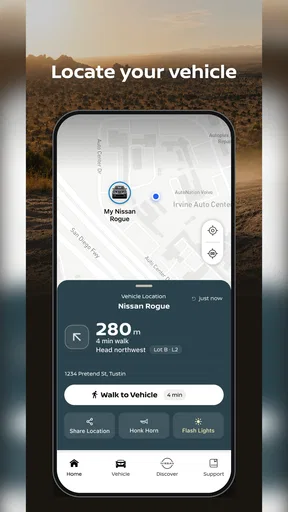
That distinction matters in a real routine. On a chilly morning, I might use the app to prepare the car before heading outside, then confirm the action in the app rather than tapping repeatedly if the response is not immediate. In a crowded parking area, a location tool can help me orient myself, but it is still sensible to look around and follow the app’s guidance instead of expecting it to do the searching for me. These are small conveniences, not replacements for paying attention to the vehicle and its surroundings.
Busy days, repeated checks, and useful habits
The app makes more sense when I use it as part of a light ownership routine rather than opening it only during a problem. Maintenance reminders can help turn a vague “I should book that soon” into a prompt to plan service. I would still compare a reminder with the car’s own guidance and the records from the last visit; the app can make information easier to find, but it does not remove the owner’s responsibility to check what is appropriate for their vehicle.
A practical habit is to look over the vehicle details and maintenance information when I have time, not while standing in a rush beside the car. That gives me a chance to spot anything that needs attention and decide whether to arrange service through the app or use the contact method I already trust. For someone managing a busy week, having reminders, service access, and vehicle-related updates together can reduce the number of places to check. The trade-off is that one more app becomes part of the routine, so it is worth keeping notifications and account details organized rather than letting alerts become background noise.
Stability, recovery, and the limits of remote convenience
I would not judge reliability solely by whether the app opens quickly. A remote action involves more than the phone interface, so a delay or an unsuccessful request can be frustrating even when the app itself is behaving normally. If a command does not appear to take effect, my sensible next step is to pause, check the app’s status, and verify the vehicle directly where practical; repeatedly sending the same request is unlikely to make the situation clearer. For anything urgent or safety-related, I would use the appropriate direct method rather than depend on a phone feature.
Worth Reading Before You Choose

EA SPORTS FC Mobile 26 Is a Bigger Football Game, but It Takes Time

Flipboard Shows What News Apps Must Do Beyond the Feed

Switching to Android Auto Means Rethinking Your Driving Routine

Google Calendar Makes a Crowded Week Easier to Manage

Ludo King Makes the Most of the Minutes Between Plans

Baby Panda World Brings Quick Play to Modern Phones, but Its Game Library Feels Busy
There is also a useful boundary to keep in mind: MyNISSAN is most valuable as a companion to owning and maintaining a Nissan, not as a general-purpose driving app. A map app is a better choice for navigation, and a calendar or maintenance log may be enough for someone who only wants reminders. Conversely, a Nissan driver who wants remote access and ownership information in one place has a stronger reason to try this than someone who never uses connected vehicle features. I would not assume that every Nissan model offers the same controls; before building a routine around one feature, I would check what appears for my own vehicle after setup.
The app has a meaningful audience: Nissan owners who like handling small car tasks from their phone, especially those who appreciate reminders and remote convenience. It is less useful to people who do not own a compatible Nissan, dislike account-based services, or rarely need anything beyond navigation and a basic service record. Its rating averages 4.4 from around 21,000 ratings, and it has been installed over 500,000 times, suggesting that many owners find a reason to keep it. Those figures are context, not a promise that every feature will suit every car or routine.
My overall expectation is moderate and practical: this is a vehicle-specific utility, not an app I would open for entertainment or use as a substitute for checking the car. I would install it, complete setup when I have a few uninterrupted minutes, confirm which options are available for my vehicle, and then keep the maintenance and remote tools I actually use within easy reach. That approach makes it more likely to feel helpful instead of turning into another source of notifications.
Hey there, fellow app explorers! So, I recently took the plunge and downloaded the MyNISSAN® app, and let me tell you, it’s like having a co-pilot right in your pocket. If you’re a Nissan owner or just curious about what this app can do, stick around. I’m about to dive into everything this nifty app offers, and spoiler alert: it’s pretty darn cool!
Getting Started with MyNISSAN®
First things first, downloading the MyNISSAN® app was a breeze. Available on both Android and iOS, it’s just a quick search away in your app store. Once installed, I was greeted with a sleek and user-friendly interface. Setting up my account was straightforward, and I loved how the app smartly syncs with my vehicle details. It’s like the app already knows me!
Features That Make Life Easier
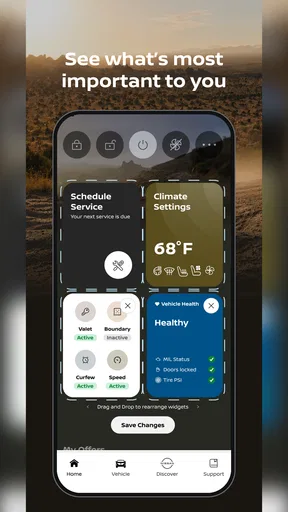
Now, let’s talk features. The app is packed with them, and honestly, I was impressed. You’ve got your vehicle’s maintenance schedule right at your fingertips, which means no more sticky notes or trying to remember when your next oil change is due. Plus, it sends reminders! How’s that for taking care of business?
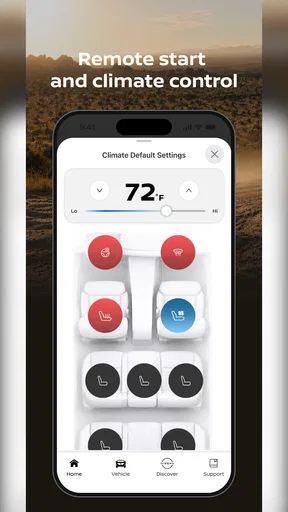
Another cool feature is the remote access. Imagine being able to start your car on a chilly morning without stepping outside. Yep, the MyNISSAN® app lets you do just that. It’s like having a magic wand, but for your car. And for those of us who constantly misplace our car in a parking lot, the app’s location services are a lifesaver.
Staying Connected
One thing I really appreciate is how the app keeps me connected to Nissan. Whether it’s the latest news, service promotions, or even recall information, it’s all there. It’s kind of like having your own personal news feed tailored just for your car. And, if you ever need support, the app makes it super easy to schedule service appointments or get in touch with customer service.
The most useful way I see those pieces fitting together is as a quick ownership check before a busy day. If a maintenance reminder is coming up, I can look at it while planning the week rather than waiting until the car is already due for attention. If I need service, having the appointment option nearby may shorten the path from noticing a task to arranging it. I would still keep the visit details and any paperwork I need, but the app can make the first step less easy to forget.
Choosing it over a general car app
Compared with a general vehicle log or a calendar reminder, the specific advantage here is the Nissan connection: the same place can bring together vehicle details, service-related information, and remote access where those options are available. A generic app may be more flexible if I own several makes or simply want to record fuel, expenses, and repairs in my own format. MyNISSAN is a better fit when I want Nissan-focused convenience rather than a customizable database.
I would also separate it from navigation and roadside tools. It is not the app I would choose to find a route or replace a map, and I would not make it my only plan for an urgent situation. Its value is in ownership tasks that can be handled calmly: checking a reminder, locating the parked vehicle, or trying a remote action when I have enough time to confirm the result. That narrower role is a strength when it matches my needs, but a reason to skip it if I am looking for an all-purpose motoring toolkit.
Setup choices that make the app more useful
When setting it up, I would take a moment to make sure the vehicle information shown in the account is the one I expect before relying on reminders or controls. This is a small but important check: a connected app is only helpful when I am looking at the right vehicle. I would also decide which notifications I genuinely want to see. Keeping service prompts visible can be useful; allowing every update to interrupt the day may make me ignore the alerts that matter.
If another person in the household also handles the car, it is worth agreeing on who will watch maintenance reminders and arrange appointments. Otherwise, two people may assume the other has dealt with a service prompt—or both may make the same call. The app can support a shared routine, but it does not decide who is responsible. For a single driver, a quick check at a regular time, such as when planning the coming week, is an easy way to make the maintenance information actionable without constantly opening the app.
When a feature does not respond as expected
Remote convenience is most satisfying when it works as part of a normal routine, but I would not build a plan that depends on a command succeeding at the exact moment I need it. If a request seems delayed, I would avoid sending several more commands in a row. I would check the app again, give the vehicle a chance to respond, and use a direct alternative if timing matters. That is a practical trade-off of managing a car through a phone: the interface is convenient, while the vehicle and connection remain part of the process.
For a less time-sensitive issue, I would try again later and use the app’s support or service options if the problem persists. For a car that is not where I expect it to be, location information can be a helpful clue, but I would not treat a phone display as proof of the vehicle’s exact position. The useful mindset is to treat connected functions as assistance, then confirm important outcomes in the real world.
Who is likely to keep it installed
I think the strongest case is for a Nissan owner who wants a single convenient place to check vehicle-related information and occasionally use remote access. It may be especially worthwhile if maintenance reminders are easy to lose among emails, notes, or paperwork, or if the car is often parked somewhere that makes finding it a nuisance. Someone who already has a reliable service routine and never wants to control a vehicle from a phone may see less benefit, and a driver of another make should look to that manufacturer’s own tools instead.
There is no need to make the app part of every drive. I would use it when it solves a specific small problem and leave it alone otherwise. That keeps its role clear: a companion for Nissan ownership, not a replacement for the dashboard, a mechanic’s advice, a map, or common sense. If that balance sounds right, the free price makes trying it a low-commitment way to see whether its available tools suit your vehicle and habits.
The Road Ahead
So, who is this app for? Honestly, if you’re driving a Nissan, the MyNISSAN® app is a no-brainer. It’s all about convenience and making your driving experience as seamless as possible. Even if you’re not a tech wizard, you’ll find the app intuitive and easy to navigate. It’s like having a personal assistant dedicated to your car’s needs.
And there you have it, folks! Whether you’re already part of the Nissan family or considering joining, the MyNISSAN® app is a must-try. From remote controls to maintenance tracking, it’s got everything you need to keep your ride in top shape. So, go ahead, give it a spin and see how it transforms your driving experience. Happy driving!
Pros
- User-friendly interface enhances navigation.
- Real-time vehicle status updates available.
- Remote start and lock features included.
- Maintenance reminders keep car care on track.
- Customizable alerts for personal preferences.
Cons
- Limited functionality for older vehicle models.
- Requires stable internet for optimal use.
- Occasional app crashes reported by users.
- Some features locked behind a paywall.
- Not all regions have full feature support.
FAQs for MyNISSAN®
What features does the MyNISSAN® app offer?
The MyNISSAN® app provides a range of features designed to enhance your driving experience. These include remote start and stop, vehicle health reports, maintenance scheduling, and route planning. Additionally, users can access their owner’s manual, receive recall notifications, and locate nearby Nissan service centers through the app.
Is the MyNISSAN® app compatible with all Nissan vehicles?
The MyNISSAN® app is compatible with most Nissan vehicles equipped with NissanConnect® Services. However, compatibility may vary depending on the model year and specific features available in your vehicle. It is advisable to check with your dealer or the official Nissan website for detailed compatibility information regarding your specific model.
How can I set up the MyNISSAN® app on my smartphone?
To set up the MyNISSAN® app, download it from the Google Play Store or Apple App Store. Once installed, create or log in to your MyNISSAN account. Follow the prompts to connect your vehicle by entering your VIN. You may need to enable certain settings in your vehicle to complete the setup process.
Are there any subscription fees associated with using the MyNISSAN® app?
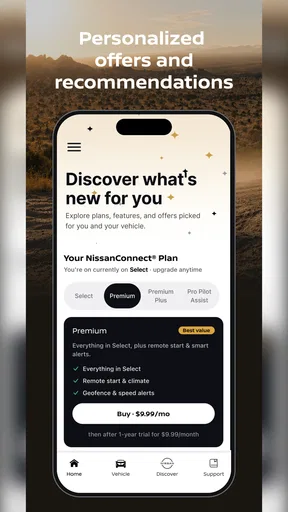
The MyNISSAN® app itself is free to download. However, certain features like remote services may require a subscription to NissanConnect® Services. Some vehicles may come with a trial period for these services, after which a subscription fee is necessary to continue accessing premium features.
What should I do if the MyNISSAN® app isn't working properly?
If the MyNISSAN® app isn’t functioning correctly, first ensure that your smartphone's operating system is up to date and check for any available app updates. Restart your device and try reconnecting. If issues persist, consult the app’s support section or contact Nissan customer service for further assistance.


